
SOLUTION
IT Risk Management
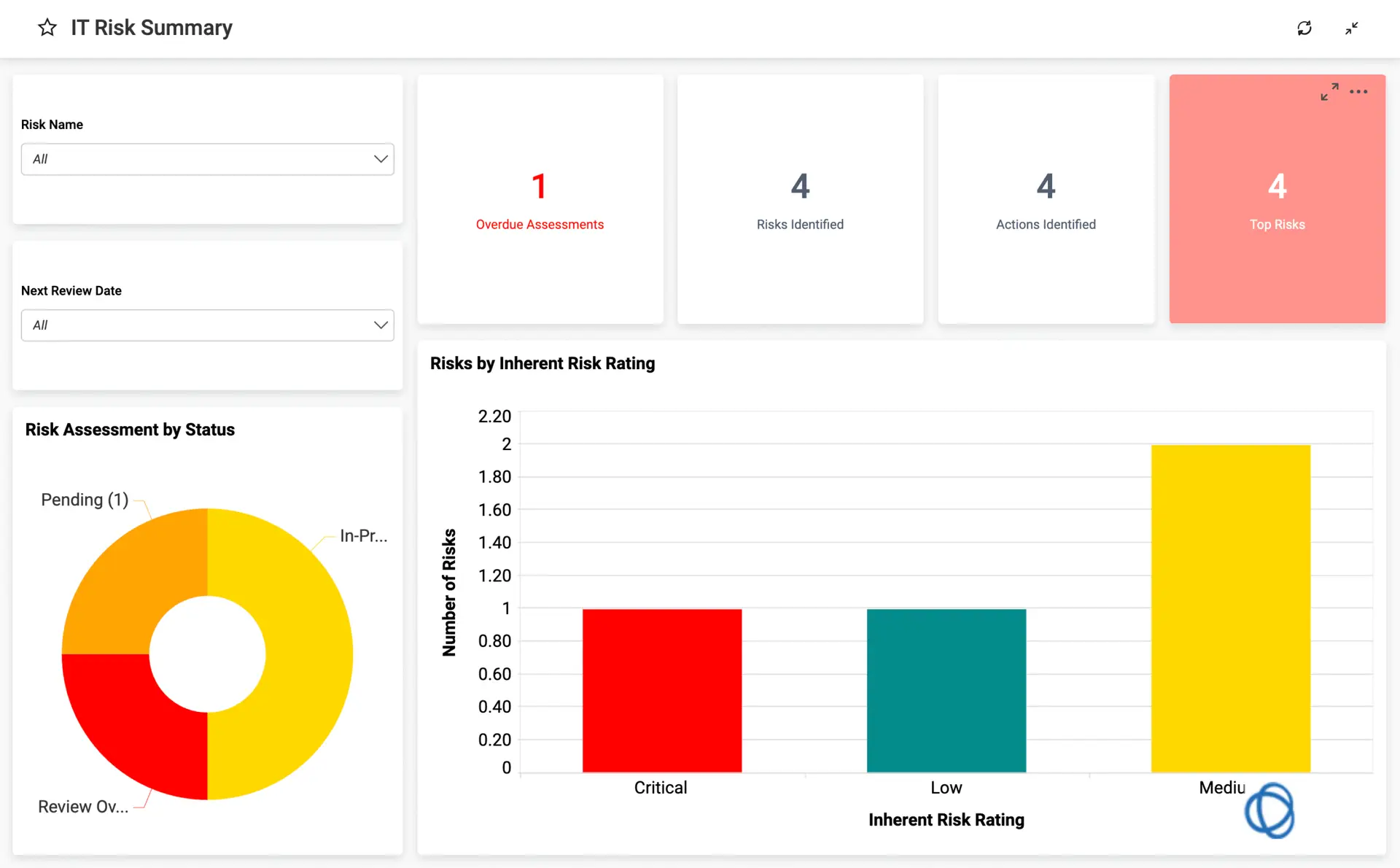
Stay Ahead of Threats
Map risks to IT assets, processes, and controls for full context.
Automate risk assessments with customizable frameworks.
Monitor emerging threats and vulnerabilities in real time.
IT risk management is the ongoing process of identifying, measuring, and reducing threats to your organization’s computer systems, networks, and data. It covers everything from cyberattacks and system failures to human error and vendor vulnerabilities.
When IT risks go unmanaged, the consequences range from operational disruptions to regulatory penalties and reputational damage. This guide walks through the core steps of IT risk management, the most common frameworks, and how dedicated software can replace scattered spreadsheets with a unified approach to protecting your technology environment.
What Is IT Risk Management
IT risk management is the ongoing process of finding, measuring, and reducing threats to your organization’s computer systems, networks, and data. Think of it as a continuous cycle rather than a one-time checklist. You identify what could go wrong, figure out how likely it is to happen and how bad it would be, then take steps to reduce your exposure.
The goal isn’t to eliminate every possible threat. That’s rarely realistic or cost-effective. Instead, IT risk management helps you focus your attention and resources on the risks that matter most to your operations. A small vulnerability in a test environment, for instance, doesn’t warrant the same urgency as a gap in your customer database security.
What makes IT risk management different from general cybersecurity? Cybersecurity focuses specifically on protecting against attacks and breaches. IT risk management takes a broader view, covering hardware failures, software bugs, human mistakes, vendor problems, and compliance gaps alongside security concerns.
Common IT Risks Organizations Face
Before you can manage risk, you have to know what you’re looking for. Most IT risks fall into a handful of categories, though the specific threats vary by industry and infrastructure.
- Cyberattacks: Hacking, ransomware, phishing, and data theft by external actors remain among the most damaging and unpredictable threats.
- System failures: Hardware crashes, software bugs, or infrastructure outages can halt operations without warning.
- Human error: Employees clicking malicious links, misconfiguring systems, or losing devices account for a significant share of security incidents.
- Vendor and third-party issues: Security gaps introduced by suppliers, cloud providers, or outside partners often go unnoticed until they cause problems.
- Compliance gaps: Failing to meet regulatory requirements can result in fines, legal exposure, and reputational damage.
A financial services firm faces different regulatory pressures than a manufacturing company, even if both rely heavily on IT systems. The same is true for healthcare organizations dealing with patient data versus retail companies processing payment information. Your risk profile depends on what you’re protecting and who’s trying to access it.
The Five-Step IT Risk Management Process
Most frameworks break IT risk management into five repeating steps. While the terminology varies slightly across standards like NIST, ISO 27001, and COBIT, the underlying logic stays consistent. Here’s how the cycle typically works:
Step | What You Track | Outcome |
Identify | Hardware, software, data assets, and dependencies | Complete inventory of what you’re protecting |
Assess | Likelihood and potential impact of each threat | Prioritized list of risks by severity |
Plan | Treatment decisions (mitigate, transfer, accept, avoid) | Clear strategy for each identified risk |
Implement | Controls, security tools, training, and remediation | Reduced exposure across your environment |
Monitor | Ongoing vulnerabilities, control effectiveness, and changes | Early warning when new risks emerge |
Identify Assets and Dependencies
The first step involves cataloging every IT asset your organization relies on. Servers, applications, databases, endpoints, cloud services, and network equipment all belong in your inventory. You’ll also want to map dependencies between systems so you understand how a failure in one area might cascade elsewhere.
This step often reveals surprises. Many organizations discover shadow IT (systems or applications employees use without official approval) or forgotten legacy systems still connected to the network. You can’t protect what you don’t know exists.
Assess Likelihood and Impact
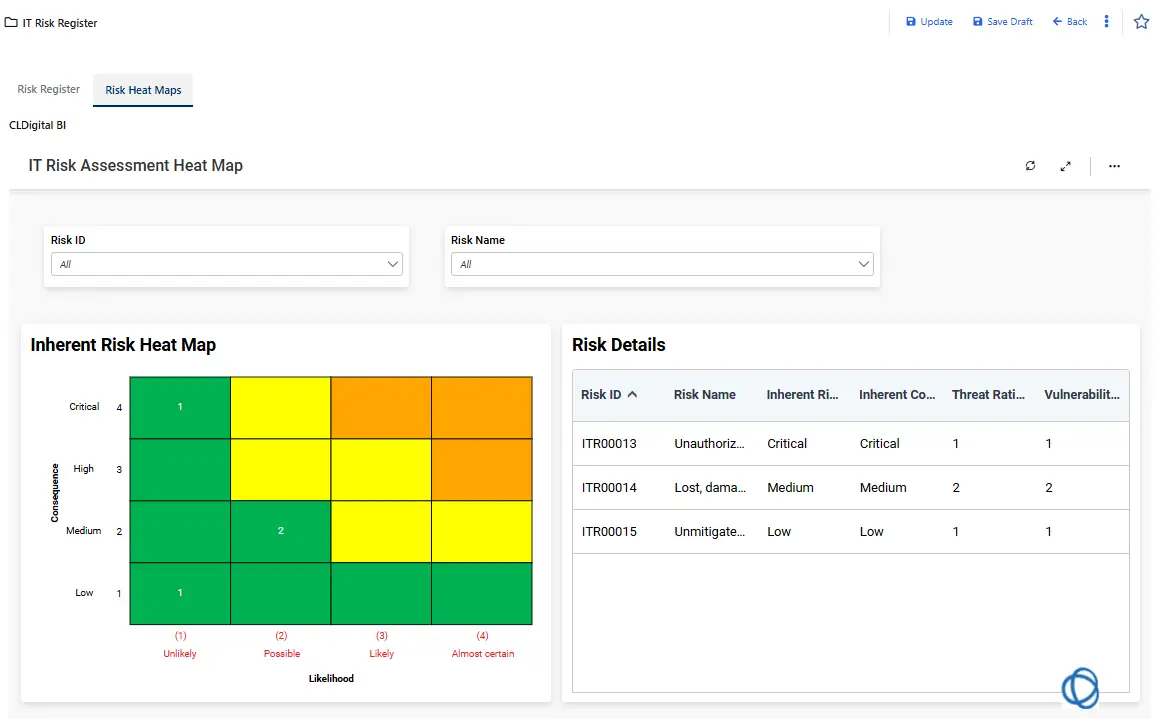
Once you know what you’re protecting, you can evaluate each risk based on two factors: how likely it is to occur and how much damage it would cause. This assessment typically produces a risk score that helps you compare threats objectively rather than relying on gut instinct.
A high-likelihood, low-impact risk (like minor software bugs) might rank lower than a low-likelihood, high-impact risk (like a major data breach). The scoring helps you allocate resources where they’ll do the most good.
Plan Your Response
Not every risk warrants the same treatment. You have four basic options:
- Mitigate: Reduce the likelihood or impact through controls, training, or process changes.
- Transfer: Shift the risk to another party through insurance, contracts, or outsourcing.
- Accept: Acknowledge the risk and choose to live with it, usually because the cost of remediation outweighs the potential impact.
- Avoid: Eliminate the risk entirely by stopping the activity that creates it.
Documenting your decisions creates accountability and clarity. When an auditor asks why you haven’t addressed a particular vulnerability, you can point to your risk assessment and explain your reasoning.
Implement Controls and Remediation
This is where planning turns into action. You might deploy firewalls, encrypt sensitive data, establish backup procedures, or roll out security awareness training. Each control ties back to a specific risk you identified earlier.
Implementation also includes assigning ownership. Someone has to be responsible for each control, with clear deadlines and accountability for follow-through.
Monitor Continuously
Risks don’t stay static. New vulnerabilities emerge, systems change, and threat actors adapt their tactics. Continuous monitoring tracks vulnerabilities, control drift, asset changes, and remediation status over time.
A risk register, which is a centralized record of risks, owners, due dates, and current status, helps you maintain visibility without relying on scattered spreadsheets. The register becomes your single source of truth for what’s been identified, what’s being addressed, and what still needs attention.
Popular IT Risk Management Frameworks
Frameworks provide structure and credibility to your risk management efforts. They also help when auditors or regulators ask how you’re managing IT risk. Here are the most widely adopted options:
- NIST Cybersecurity Framework: A U.S. standard that organizes risk activities into five functions: Identify, Protect, Detect, Respond, and Recover. It’s flexible enough for organizations of any size.
- NIST Risk Management Framework (RMF): Common in federal agencies and government contractors, RMF provides a detailed, step-by-step process for authorizing and monitoring systems.
- ISO 27001: An international standard focused on information security management systems, often required for global operations or enterprise contracts.
- COBIT: A governance framework that connects IT risk to broader business objectives and performance metrics.
You don’t have to pick just one. Many organizations blend elements from multiple frameworks depending on their regulatory environment and operational priorities. A company doing business with the federal government might use RMF for those contracts while applying ISO 27001 to their commercial operations.
How IT Risk Management Supports Compliance
Regulatory requirements often drive IT risk management initiatives. Standards like HIPAA, PCI DSS, SOX, and GDPR all expect organizations to identify, assess, and control IT-related risks. A well-documented risk management process makes audits smoother and demonstrates due diligence to regulators.
The connection works both ways. Compliance frameworks typically specify controls you’re expected to have in place, and your risk assessments help you prioritize which controls to implement first. When you can show exactly how you’re protecting sensitive data and critical systems, audit conversations become much more straightforward.
Beyond avoiding fines, compliance-aligned risk management builds trust with customers, partners, and stakeholders who want assurance that their data is protected.
Connecting IT Risk to Business Continuity
IT risk management doesn’t exist in isolation. The same threats that affect your technology infrastructure can disrupt business operations, customer service, and revenue. That’s why many organizations link IT risk management to broader business continuity and operational resilience programs.
When you understand which IT systems support critical business processes, you can prioritize protection and recovery efforts accordingly. A server outage affecting payroll carries different urgency than one affecting an internal wiki. Dependency mapping helps you visualize connections between IT assets and business functions so you’re not guessing which systems matter most during a disruption.
This integration also helps with resource allocation. If leadership understands that a particular system supports a revenue-generating process, they’re more likely to approve budget for protecting it.
Benefits of IT Risk Management Software
Spreadsheets and manual processes can work for small-scale risk tracking, but they struggle as your organization grows. Version control becomes a nightmare, data gets siloed across departments, and keeping information current requires constant manual effort.
Dedicated IT risk management software addresses these challenges by centralizing your risk data and automating routine tasks. All risks, controls, and remediation activities live in one place. Configurable workflows guide users through risk identification and scoring without starting from scratch each time. Dashboards and alerts surface emerging threats and overdue remediation tasks before they escalate.
Built-in reporting aligned with common frameworks reduces the scramble before compliance reviews. Role-based access ensures different stakeholders see the information relevant to their responsibilities without exposing sensitive data unnecessarily.
Request a demo to see how CL360 simplifies IT risk management for enterprise teams.
How CL360 Supports IT Risk Management
CL360’s no-code platform adapts to your organization’s risk management approach rather than forcing you into a rigid structure. You can configure risk categories, scoring models, and workflows to match your existing processes or align with frameworks like NIST, ISO 27001, or COBIT.
The platform includes risk registers that track risks, owners, treatment decisions, and remediation status over time. Dependency mapping connects IT assets to business processes and third-party relationships. Automated workflows route assessments, approvals, and escalations without manual handoffs. Real-time dashboards give executives and risk managers visibility into current exposure.
Because CL360 supports enterprise risk management, cyber risk management, and operational resilience alongside IT risk, you can build a unified view of risk across your organization rather than maintaining separate systems for each discipline.
Request a demo to see how CL360 helps enterprise teams manage IT risk with confidence.
“Our business is global and changes daily. The ability to easily move plans and folders within CLDigital with no coding saves us a ton of time every year.”
Chief Information Officer
- Large Insurance Company (UK)
“CLDigital gave us real-time visibility and control, bringing risk and compliance into one coherent view.”
Chief Risk Officer
- Global Financial Institution (UK)
“We replaced dozens of spreadsheets and legacy systems with one intuitive dashboard with no code required.”
Enterprise Risk Manager
- U.S. Healthcare Organization
Resilient Systems
Quantify IT risk exposure to prioritize remediation efforts.
Align IT risk posture with cybersecurity and compliance goals.
BENEFITS
Spot IT Vulnerabilities
Maintain System Uptime
Structured IT Assessment
Reduce compliance risk with structured IT risk assessments.
Align IT Objectives
FAQ
Solution FAQs
What is IT Risk?
What are the key functionalities of IT Risk?
What are the main steps in IT risk management?
Most frameworks follow five steps: identify assets and vulnerabilities, assess likelihood and impact, plan treatment strategies, implement controls and remediation, and monitor continuously for changes.
How does IT risk management support compliance?
A documented risk management process demonstrates due diligence to regulators and auditors. Many platforms include reporting templates aligned with standards like NIST, ISO 27001, HIPAA, and PCI DSS.
What are the benefits of IT Risk?
What are the challenges of IT Risk?
How does IT risk management software automate assessments?
Software platforms use configurable workflows to guide users through risk identification and scoring. Templates, automated notifications, and pre-built scoring models reduce manual effort and ensure consistency across assessments.
Can IT risk management help reduce manual spreadsheet tracking?
Yes. Dedicated platforms centralize risk data, automate workflows, and provide real-time dashboards, eliminating the version control issues and data silos that come with spreadsheet-based tracking.
GET STARTED
Let's Connect
Discover how our platform can help you achieve better outcomes and you prepare for what’s next in risk and resilience.